
Made in India
KDK Software - Tax Compliance Solutions KDK Software - Tax Compliance Solutions
Made in India
  • Home
  • Products
    • Cloud Solutions
      • Spectrum Cloud
      • ExpressGST
      • ExpressITR
      • ExpressTDS
      • ExpressReco
    • Desktop Solutions
      • Zen PDF Signer
      • Spectrum
      • Income Tax
      • TaxSuite
      • e-TDS
  • Blog
  • Education
  • Company
    • About Us
    • Our Team
    • Customers
    • Careers
  • Resources
    • GST Number Search
    • Income Tax Mapper
    • TDS Calculator
  • Contact Us
Home › Blog › What is 2A reconciliation? How to do it correctly in GST Software ? Get Demo #ExpressGST
Daily Bites

What is 2A reconciliation? How to do it correctly in GST Software ? Get Demo #ExpressGST

26 Feb 2021 By KDK Software

What is GSTR 2A?

GSTR-2A is a system-generated purchase tax return for every GST-registered business. GSTR -2A is auto-populated from GSTR-1, GSTR- 5, and GSTR-6 uploaded by the seller/ supplier. It details the purchases made by a company (purchaser/buyer) for a month.

The purchaser is not required to file the GSTR-2A. GSTR 2A is auto-populated from the –1.  GSTR-1: Regular registered seller, 2.GSTR-5: Non-resident, 3. GSTR-6: Input Service Distributor, 4. GSTR-7: Person liable to deduct TDS, 5. GSTR-8: Ecommerce

Unlike the GSTR-2, the GSTR-2A is non-editable.  The purchaser (concerned company) should doubly check this form and rectify discrepancies, if any, before filling it on the GST portal.

There is no due date to file the GSTR-2A, as the same is a read-only document that displays the data from the seller’s GSTR-1.

What is GSTR-2A reconciliation?

Reconciliation of GST requires matching the data uploaded by the seller/ supplier with the buyer/purchaser’s purchase data. This basically necessitates that the details of sales made by the seller/supplier for a particular month be filed as a part of GSTR-1 (automatically reflected in GSTR-2A) and should reconcile with the ITC claimed in form GSTR-3B (summary of return)claimed by the purchaser/ buyer.

Mentioned below are the reasons why GSTR-3B should match the details in GSTR-2A:

  • The GST authorities issued notices to many taxpayers asking them to reconcile the ITC (Input Tax Credit) in the self-declared Form GSTR-3B with the portal-generated GSTR-2A. Failure to reply to such notices would result in them paying the differential amount.
  • Actions have been taken against eluders for claiming ITC against illicit invoices.
  • Reconciliation ensures that the credit claimed is in accordance with the tax paid to the supplier/seller.
  • It polices duplicate or missed invoices.
  • In the event that the supplier/seller has not entered an invoice in the Form GSTR-1, the supplier/seller is made aware of the same, thus ensuring that discrepancies stand rectified.
  • Errors made while reporting details in GSTR-1 on the part of the supplier/seller or GSTR-3B on the part of the purchaser/ buyer can be corrected.
  • Go to www.expressgst.com and log in using your credentials.
  • Click on the +(Plus)icon to create the Company/Client Master for which 2A/2B reconciliation is required.
  • The following window will appear.

How to reconcile 2A/2B using the “2A tool from Express GST”?

  • Enter the GSTIN User Name and GSTIN Password to proceed with the 2A reconciliation process.
  • Enter the other requested details in the Client Master form. Once entered, your Company Master is created. You can now begin the process of 2A reconciliation in 2A.epressgst.com
  • You will have entered the dashboard of the 2A reconciliation tool. You should be able to see a blue tab – “Import Books/2A data” on the left of your screen.  Click the tab.
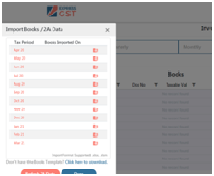
  • The following window will open.
  • Here you will be able to import the 2A data/ books for the required month(s). To import, you can use any of the mentioned templates – i. KDKii. Govt. Portal origin. Tally Templates. It is suggested that you download the data from the Import option. Once done, click on the “Refresh 2A Data” button on the base of the “Import Books/ 2A Data” box.
  • The following 2A Reconciliation Dashboard screen appears.
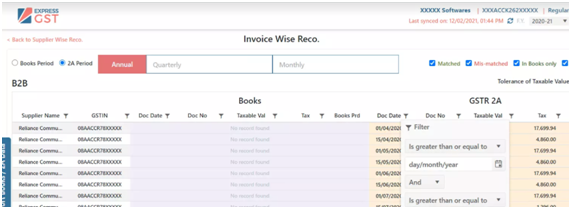
  • The data that appears would by default be that of the supplier. However, if you would like to view the data as Invoice Wise Reconciliation, you would have to select the “Invoice Wise Reco” tab.
  • Use “Filter” to select a specific field value. It works as smoothly as excel.
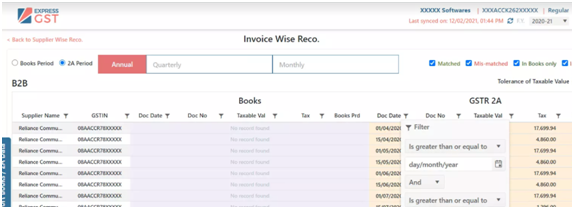
  • To identify any mismatched values in the 2A reconciliation, you can use various filters the 2A.epressgst.com has to offer.
  • You could also use base data to carry out your 2A reconciliation. This is done by either making “Books Period” as base OR “2A Period” as a base, selecting multiple quarters OR months.

Video Demo!
ExpressGST (A Cloud GST Software) provides the most powerful and Advanced Reco (Reconciliation) Tool that comes packed with 7X faster GST reconciliation and AI to auto-identify, match entries and assure 100% ITC claim.

Similar Posts

GST Registration Online: How to Register for GST & Get Your GSTIN Number (2026) ExpressGST GST Registration Online: How to Register for GST & Get Your GSTIN Number (2026) GSTR-1 Filing: What is GSTR-1 Form, Due Date & How to File Online (2026) ExpressGST GSTR-1 Filing: What is GSTR-1 Form, Due Date & How to File Online (2026) KDK Software Featured Among ET Edge Bharat’s Best to a Billion KDK News KDK Software Featured Among ET Edge Bharat’s Best to a Billion
Back to Blog

Keep in touch

Categories

Daily Bites (102) Products Knowledge Base (54) Insights (24) GST Update (18) General (15) Spectrum Cloud (14) ExpressGST (13) Productivity (9) KDK News (7) KDK Update (7) ExpressITR (5) Strive for Excellence (5) ExpressTDS (3)

Popular Posts

  • GST Registration Online: How to Register for GST & Get Your GSTIN Number (2026) GST Registration Online: How to Register for GST & Get Your GSTIN Number (2026)    7 Apr 2026
  • GSTR-1 Filing: What is GSTR-1 Form, Due Date & How to File Online (2026) GSTR-1 Filing: What is GSTR-1 Form, Due Date & How to File Online (2026) 6 Apr 2026
  • KDK Software Featured Among ET Edge Bharat’s Best to a Billion KDK Software Featured Among ET Edge Bharat’s Best to a Billion  4 Apr 2026
  • Desktop vs Cloud Tax Software in India: The Real Cost for CA Firms (2026) Desktop vs Cloud Tax Software in India: The Real Cost for CA Firms (2026) 30 Mar 2026
  • How Much Does It Actually Cost to Run a CA Firm in India? (2026 Breakdown) How Much Does It Actually Cost to Run a CA Firm in India? (2026 Breakdown) 27 Mar 2026

Tags

GST (49) KDK Support (40) Income tax (33) spectrum (29) GST News (24) government (19) TDS (15) tds filing (13) ExpressGST (11) tax software (9) Spectrum Cloud (7) compliance (7) announcement (6) council meetings (6) Migrate to Spectrum Cloud (5) ExpressTDS (1) GSTR1 (1) Indian Enterprise Recognition (1) ET Edge (1) Economic Times (1)
About Us

KDK Software - The Trusted Choice for Countless Tax Filers. Renowned as a Pioneer in Tax Compliance, KDK Stands Tall in Providing Solutions for ITR, TDS, and GST Software Needs.

Read more!

Social Links
  • Facebook
  • Instagram
  • Twitter
  • Pinterest
  • YouTube
  • Linkedin
  • KDK Software - GSP ISO Certified
Tags
  • Spectrum Cloud
  • Income Tax
  • Spectrum
  • Tax suite
  • KDK Care
  • Zen TDS
  • Cloud ITR
  • 26AS
  • GST
  • PDF Signer
  • eXBace
  • Cloud TDS
  • Blog
  • Software Demo
About KDK
  • About Us
  • Career
  • News & Media
  • Download
  • Join Partner Network
KDK Products
  • Spectrum Cloud
  • Spectrum
  • Income Tax
  • e-TDS
  • Express Reco ( 26AS Reco)
  • Express ITR ( Cloud ITR )
  • Express TDS ( Cloud TDS )
  • Express GST (Best 2A/2B Reco Tool)
  • PDF Signer
  • eXBace
  • TaxSuite
  • Enquiry Now!
Important Links
  • GST Number Search
  • TDS Calculator
  • Income Tax Mapper
  • Webinars
  • Migrate from Any Software
  • Software Download
  • Connector Download
  • Knowledge Base
  • Privacy Policy
  • Terms & Conditions
  • Product Enquiry

Support Helpline
Call: 08881012345
Email: support@kdksoftware.com
Sales Helpline
Call: 093145-17671
Email: sales@kdksoftware.com

KDK Software


Copyright 2026 All Rights Reserved.

Get Free Trial

Try Every Feature, Add Unlimited Users. No Credit Card Required!.

Spectrum Cloud Express GST Express TDS Express ITR
ET Edge Bharat's Best to a Billion
KDK Software Recognised Among Bharat's Best to a Billion
KDK Software featured among India's high-growth companies shaping the country's economic future.
Read Full Story →
Request a Demo!
Get Demo!
Contact Sales
Sales
Call @ 08881012345
Call
Connect on WhatsApp
WhatsApp
YouTube
YouTube